Columns
Use Model.Column() to describe a database column. The class attribute becomes
the SQL column name.
from datetime import datetime
from decimal import Decimal

from model import Model
from model.column import CURRENT_TIMESTAMP
from model.database import SQLiteDatabase

database = SQLiteDatabase("shop.sqlite3")


class Product(Model):
    table = "product"
    db = database

    id: int = Model.Column(
        type="INT",
        index="PRIMARY",
        auto_increment=True,
    )
    sku: str = Model.Column(
        type="VARCHAR",
        length=40,
        index="UNIQUE",
        can_be_null=False,
    )
    price: Decimal = Model.Column(
        type="DECIMAL",
        precision=10,
        scale=2,
        can_be_null=False,
    )
    description: str | None = Model.Column(type="TEXT")
    created_at: datetime = Model.Column(
        type="TIMESTAMP",
        can_be_null=False,
        default_value=CURRENT_TIMESTAMP,
    )
The same declarations work with MySQL, MariaDB, and SQLite.
Column arguments
All arguments are keyword-only.
| Argument | Purpose |
|---|---|
type |
The required SQL data type for the column. |
index |
The type of index created for the column. Accepts "PRIMARY", "UNIQUE", "INDEX", or None. |
length |
The length of a CHAR or VARCHAR column. Required for those types. |
precision, scale |
Configure DECIMAL precision and scale. They default to 10 and 0, respectively. |
can_be_null |
Whether the column can contain SQL NULL. Defaults to True. |
default_value |
The value assigned by the database when an insert omits the column. |
auto_increment |
Whether the database automatically generates increasing integer values. Supported only for integer primary keys. |
on_update_current_timestamp |
Whether a DATETIME or TIMESTAMP column is set to the current date and time when its row is updated. |
parser |
Custom serialize and deserialize callables for converting or validating column values. |
init |
Controls whether the column appears in the constructor signature generated for type checkers. It does not affect runtime behavior. |
Invalid combinations fail static type checking and also raise a ColumnError at runtime.
Annotations and nullability
Columns are nullable by default (except primary keys).
Annotate the value correctly depending on its nullability. For example:
- use
str | Nonewith the defaultcan_be_null=True; - use just
strwhencan_be_null=False;
Supported types
| SQL type | Python type | Notes |
|---|---|---|
CHAR |
str |
Fixed-length text, commonly used for values such as country or currency codes. length is required, from 1 to 255. |
VARCHAR |
str |
Variable-length text, commonly used for values such as names and email addresses. length is required, from 1 to 65,535. |
TEXT |
str |
Long-form text. |
MEDIUMTEXT |
str |
Medium-sized text data. |
LONGTEXT |
str |
Large text data. |
TINYINT |
int |
Very small integer, commonly used for boolean-like flags and status values. |
SMALLINT |
int |
Small integer. |
MEDIUMINT |
int |
Medium-sized integer. |
INT |
int |
General-purpose integer, commonly used for identifiers and counters. |
BIGINT |
int |
Large integer for identifiers or counters that may outgrow INT. |
FLOAT, DOUBLE |
float |
Approximate numeric values; use DECIMAL when exact arithmetic matters. |
DECIMAL |
decimal.Decimal |
Exact numeric values, commonly used for money. precision is 1 to 65; scale is 0 to 30 and no greater than precision. |
DATE |
datetime.date |
Date without a time. |
TIME |
datetime.timedelta |
Time of day or duration; see SQLite notes below. |
DATETIME, TIMESTAMP |
datetime.datetime |
Date and time; supports current-timestamp defaults and automatic updates. |
TINYBLOB |
bytes |
Small binary data. |
BLOB |
bytes |
Binary data. |
MEDIUMBLOB |
bytes |
Medium-sized binary data. |
LONGBLOB |
bytes |
Large binary data. |
Text and binary types do not support defaults or single-column indexes.
MySQLTypes and SQLiteTypes classes from model.column provide constants with helpful docstrings:
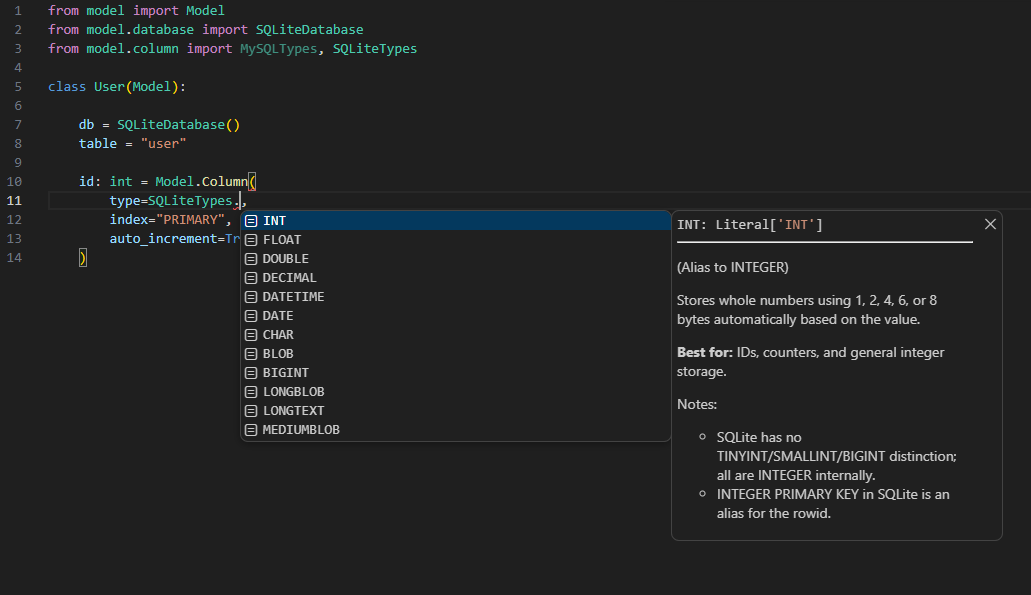
For backend-specific storage limits and behavior, see MySQL data types.
Indexes and row identity
index value |
Behavior |
|---|---|
"PRIMARY" |
Unique row identity; at most one per model. |
"UNIQUE" |
Unique constraint and an alternative row identity. |
"INDEX" |
Non-unique query index; cannot load a row by itself. |
Every model needs a primary column, unique column, or unique composite index so that a row can be loaded after a write.
For an auto-incrementing primary key, use INT:
Composite indexes with MultiIndex
Model.MultiIndex combines at least two columns:
class Membership(Model):
    table = "membership"
    db = database

    id: int = Model.Column(
        type="INT", index="PRIMARY", auto_increment=True, init=False
    )
    user_id: int = Model.Column(type="INT", can_be_null=False, init=True)
    team_id: int = Model.Column(type="INT", can_be_null=False, init=True)
    role: str = Model.Column(type="VARCHAR", length=30, can_be_null=False)

    by_user_and_team = Model.MultiIndex("UNIQUE", user_id, team_id)


membership = Membership(user_id=7, team_id=12)
Use "UNIQUE" when the complete combination must be unique and should identify
a row. Use "INDEX" only to improve queries. Assign the index to an unannotated,
stable class attribute: its name is used as the index identity during schema
sync.
init=True affects only the signature generated for type checkers. At runtime,
primary and unique constraints determine which arguments can load a row.
Defaults and timestamps
default_value defines the SQL DEFAULT for the column. The database uses this value when an insert omits that column.
The default must match the column's storage type: str, int, float, Decimal, date, timedelta, or datetime. Text and blob columns do not support defaults.
For datetime and timestamp columns, use the CURRENT_TIMESTAMP object from model.column as the default to have the database set the current timestamp automatically when the row is inserted.
from datetime import datetime

from model.column import CURRENT_TIMESTAMP


created_at: datetime = Model.Column(
    type="TIMESTAMP",
    can_be_null=False,
    default_value=CURRENT_TIMESTAMP,
)

updated_at: datetime = Model.Column(
    type="TIMESTAMP",
    can_be_null=False,
    default_value=CURRENT_TIMESTAMP,
    on_update_current_timestamp=True,
)
Custom Python types with parsers
Here's an example of how you can store and load JSON by using a TEXT column and a custom parser:
import json
from typing import Any

def serialize_settings(value: dict[str, Any]) -> str:
    return json.dumps(value)

def deserialize_settings(value: str) -> dict[str, Any]:
    decoded = json.loads(value)
    if not isinstance(decoded, dict):
        raise ValueError("settings must contain a JSON object")
    return decoded

class UserSettings(Model):
    table = "user_settings"
    db = database

    user_id: int = Model.Column(type="INT", index="PRIMARY")
    settings: dict[str, Any] = Model.Column(
        type="TEXT",
        can_be_null=False,
        parser={
            "serialize": serialize_settings,
            "deserialize": deserialize_settings,
        },
    )
The parser methods are called like this:
During insert/update
During retrieval/access of values
Serializers run for insert(), insert_or_update(), and update() values.
Deserializers run when rows or lazily loaded columns are read. Exceptions from
either callable propagate to the caller.
For nullable fields, both callables must handle None; Model does not skip the
parser for SQL NULL. Constructor identities are
not serialized, so storage-native types are the safest choice for primary keys.
Parsers can be used with Pydantic models too, or custom validator functions.
A parser is application behavior, not a database constraint. Raw SQL and other clients bypass it.
SQLite compatibility
SQLite tables created by schema sync use converters and CHECK constraints to
approximate the types and limits above. Existing tables are not retrofitted.
The important differences are:
- SQLite does not reproduce MySQL
CHARpadding orTIMESTAMPtimezone rules. - Date/time adapters use whole seconds; datetime microseconds are not preserved.
- SQLite
TIMEsupportsHH:MM:SS, not negative or longer-than-24-hour MySQL durations. - SQLite numeric storage is not identical to MySQL's exact
DECIMALbehavior.